
원본 : 노마드코더 강의
본 자료는 노마드코더의 강의를 따라 실습하면서, 연습하는 글로 모든 연습 코드의 원작자는 니콜라스 선생님이 쓰신 코드를 사용해서 변형하고 연습했습니다.
구현된 모습
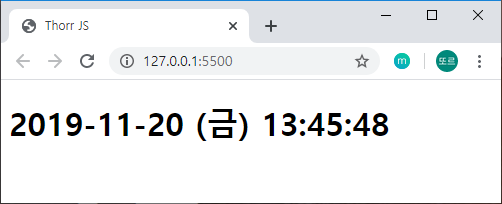
- index.htmldiv 클래스 내부에 h1 클래스에 시계를 만들 예정입니다.
1
2
3
4
5
6
7
8
9
10
11
12
13
<html lang="ko">
<head>
<title>Thorr JS</title>
<link rel="stylesheet" href="./index.css"/>
</head>
<body>
<div class="js-clock">
<h1 class="js-title"></h1>
</div>
<script src="./clock.js"></script>
</body>
</html>
그래서 js 파일을 만들 때에도 컨테이너를 만들어서 들어갈 div 위치를 찾습니다.
이후, 시간 값이 표시될 위치에 클래스 이름을 통해 시간 값을 표시합니다.
(주의! 본 소스는 최종본이 아닙니다. 최종 소스로 가시려면 제일 아래에 있는 소스코드를 읽어보세요..)
- clock.js
1
2
3
4
5
6
7
8
9
10
11
12
13
14
15
16
const clockContainer = document.querySelector(".js-clock"),
clockTitle = clockContainer.querySelector(".js-title");
function getTime(){
const date = new Date();
const hours = date.getHours();
const minutes = date.getMinutes();
const seconds = date.getSeconds();
clockTitle.innerText = `${hours}:${minutes}:${seconds}`
}
function init() {
getTime();
}
init()
위의 코드대로 작성을 하게 되면, 처음 불러온 그 순간의 값만 표현됩니다. 이에 대해 자동으로 반복해주는 매크로 기능이 필요합니다. => setInterval 함수
setInterval?
setInterval 함수를 쓰는 방법은 간단합니다.
1 | setInterval(함수명, 반복시간); |
함수 명이라고 표현한 이유는 위의 코드에서 getTime()을 가지고 예시를 보여주자면 아래와 같이 작성되어야한다.
- clock.js함수명을 입력해야하기 때문에 getTime()이 아닌 getTime으로 입력하고, 1000은 ms 단위기 떄문에 1000ms = 1초 라고 외워두면 편합니다.
1
2
3
4
5
6
7
function getTime() {
...
}
function init(){
setInterval(getTime, 1000);
}
위와 같이 코드를 동작시키면, 매 초마다 동작을 합니다. 이를 동작 시킬 때 11:54:9 … 11:54:10 이런 식으로 표현이 됩니다.
이때 좀 더 보기 좋게 11:54:09 처럼 보여주기 위해 아래와 같은 코드를 작성할 수 있습니다.
- clock.js하지만 강의에서 보다 더 섹쉬한 코드를 보여주었습니다. (미쵸따..)
1
2
3
4
5
6
7
8
9
10
11
12
13
function getTime(){
...
const seconds = addZeroToSec(date.getSeconds());
...
}
function addZeroToSec(seconds){
if (seconds < 10){
return `0${seconds}`;
} else {
return seconds;
}
} - clock.js
1
2
3
4
5
6
function getTime(){
...
clockTitle.innerText = `${years}-${month}-${day} ${dayText} ${hours}:${minutes}:${
seconds < 10 ? `0${seconds}` : seconds
}`;
}
저는 이 기능에서 연도, 월, 일, 요일, 시간 순으로 표현하고 싶어서 아래와 같이 소스 코드를 추가했습니다.
✨최종 코드
- clock.js
1
2
3
4
5
6
7
8
9
10
11
12
13
14
15
16
17
18
19
20
21
22
23
24
25
26
27
28
29
30
31
32
33
34
35
36
37
38
39
40
41
42
43
44
45
46
47
48
49
const clockContainer = document.querySelector(".js-clock"),
clockTitle = clockContainer.querySelector(".js-title");
function getTime(){
const date = new Date();
const years = date.getFullYear();
const month = date.getMonth();
const day = date.getDate();
const dayText = textDay(date.getDay());
const hours = date.getHours();
const minutes = date.getMinutes();
const seconds = date.getSeconds();
clockTitle.innerText = `${years}-${
month < 10 ? `0${month}` : month
}-${
day < 10 ? `0${day}` : day
} ${dayText} ${
hours < 10 ? `0${hours}` : hours
}:${
minutes < 10 ? `0${minutes}` : minutes
}:${
seconds < 10 ? `0${seconds}` : seconds
}`;
}
function textDay(day){
if(day===0){
return "(일)"
} else if (day === 1){
return "(월)"
} else if (day === 2){
return "(화)"
} else if (day === 3){
return "(수)"
} else if (day === 4){
return "(목)"
} else if (day === 5){
return "(금)"
} else if (day === 6){
return "(토)"
} else {
return " "
}
}
function init() {
setInterval(getTime,1000);
}
init()
git : https://github.com/thorr-lab/JS-STUDY
감사합니다.