
원본 : 노마드코더 강의
본 자료는 노마드코더의 강의를 따라 실습하면서, 연습하는 글로 모든 연습 코드의 원작자는 니콜라스 선생님이 쓰신 코드를 사용해서 변형하고 연습했습니다.
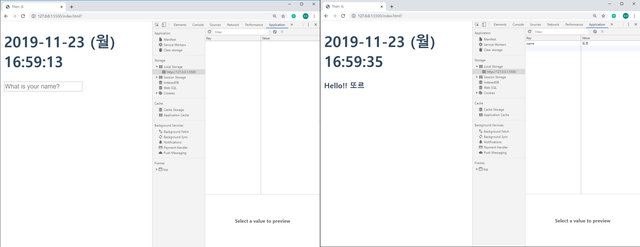
먼저 구현 화면 부터 보겠습니다.
소스 코드
- index.html
1
2
3
4
5
6
7
8
9
10
11
12
13
14
15
16
17
18
<html lang="ko">
<head>
<title>Thorr JS</title>
<link rel="stylesheet" href="./index.css"/>
</head>
<body>
<div class="js-clock">
<h1 class="js-title"></h1>
</div>
<form class="js-form form">
<input type="text" placeholder="What is your name?" />
</form>
<h4 class="js-greetings greetings"></h4>
<script src="clock.js"></script>
<script src="gretting.js"></script>
</body>
</html>
위의 내용을 보면 clock.js 때 작업 내역을 그대로 볼 수 있습니다.
추가적으로 들어간 부분은 Form 태그, 그리고 greetings 클래스를 가진 h4 태그 하나가 있습니다.
이 부분을 동작시켜 text 박스에 입력된 값을 localstorage에 저장하고, 이 값을 불러오는 화면을 구현 합니다.
- gretting.js이번 소스는 작성하면서 이해한 내용을 주석으로 작성했습니다.
1
2
3
4
5
6
7
8
9
10
11
12
13
14
15
16
17
18
19
20
21
22
23
24
25
26
27
28
29
30
31
32
33
34
35
36
37
38
39
40
41
42
43
44
45
46
47
48
49
50
51
52
53
54
55
56
const form = document.querySelector(".js-form"),
input = document.querySelector("input"),
greeting = document.querySelector(".js-greetings");
const SHOWING = "showing";
// 텍스트를 표현하는 함수
function writeText(text){
form.classList.remove(SHOWING);
greeting.classList.add(SHOWING);
greeting.innerText = `Hello!! ${text}`
}
// 로컬 스토리지에 값을 저장하는 함수
function saveText(text) {
localStorage.setItem("name", text)
}
// 로컬스토리지에 발생한 값을 감지하는 함수.
function handleSubmit(event){
event.preventDefault(); // 기존의 새로고침 기능을 막기 위해 사용된 함수
const currentValue = input.value;
writeText(currentValue);
saveText(currentValue);
}
// 입력하기 위해 텍스트 박스를 활성화 하는 함수
function askForText() {
form.classList.add(SHOWING);
form.addEventListener("submit", handleSubmit)
}
// 등록된 이름이 없다면 텍스트 박스를 띄워주고 있다면 글을 띄워주는 함수
function loadName(){
const currentName = localStorage.getItem("name");
if (currentName === null){
askForText();
// 1. 설정된 이름이 없다.
// 2. 물어보기 위한 질문 창을 열어준다.
// 3.값을 입력 받는다.
// 4. 저장한다.
// 5. 이벤트가 발생했으니 띄워준다.
} else {
writeText(currentName);
// 1. 설정된 이름이 존재한다.
// 2. 이벤트가 발생했으니 띄운다.
}
}
// 메인함수
function init() {
loadName()
}
init();
git : https://github.com/thorr-lab/JS-STUDY
감사합니다.